 Fixated on Home

Introduction to Smart Home Ecosystems in 2026
Homeowners undertaking renovations in 2026 face a critical decision when selecting a smart home platform. The three dominant ecosystems—Google Home, Amazon Alexa, and Apple HomeKit—each offer distinct advantages in compatibility, automation, and design integration. Choosing correctly can transform how your home functions, from energy management to security and daily convenience. This comprehensive guide provides an in-depth comparison to help you choose the system that aligns with your renovation goals, budget considerations, and long-term needs. Modern renovations often blend technology with architectural elements, making platform selection a foundational step rather than an afterthought.
Smart home platforms have evolved to support the Matter standard, which promises greater interoperability across devices. Understanding how each platform handles voice control, third-party device support, and privacy features is essential for creating a cohesive living space that feels both futuristic and timeless. Homeowners planning upgrades should consider not only immediate functionality but also how the chosen ecosystem will adapt to emerging technologies over the next decade.
Side-by-Side Comparison of Major Platforms
Evaluating Google Home, Amazon Alexa, and Apple HomeKit requires examining key factors such as device compatibility, user interface, ecosystem lock-in, and performance in real-world scenarios. Each platform brings unique strengths that suit different household types and renovation styles.
Google Home
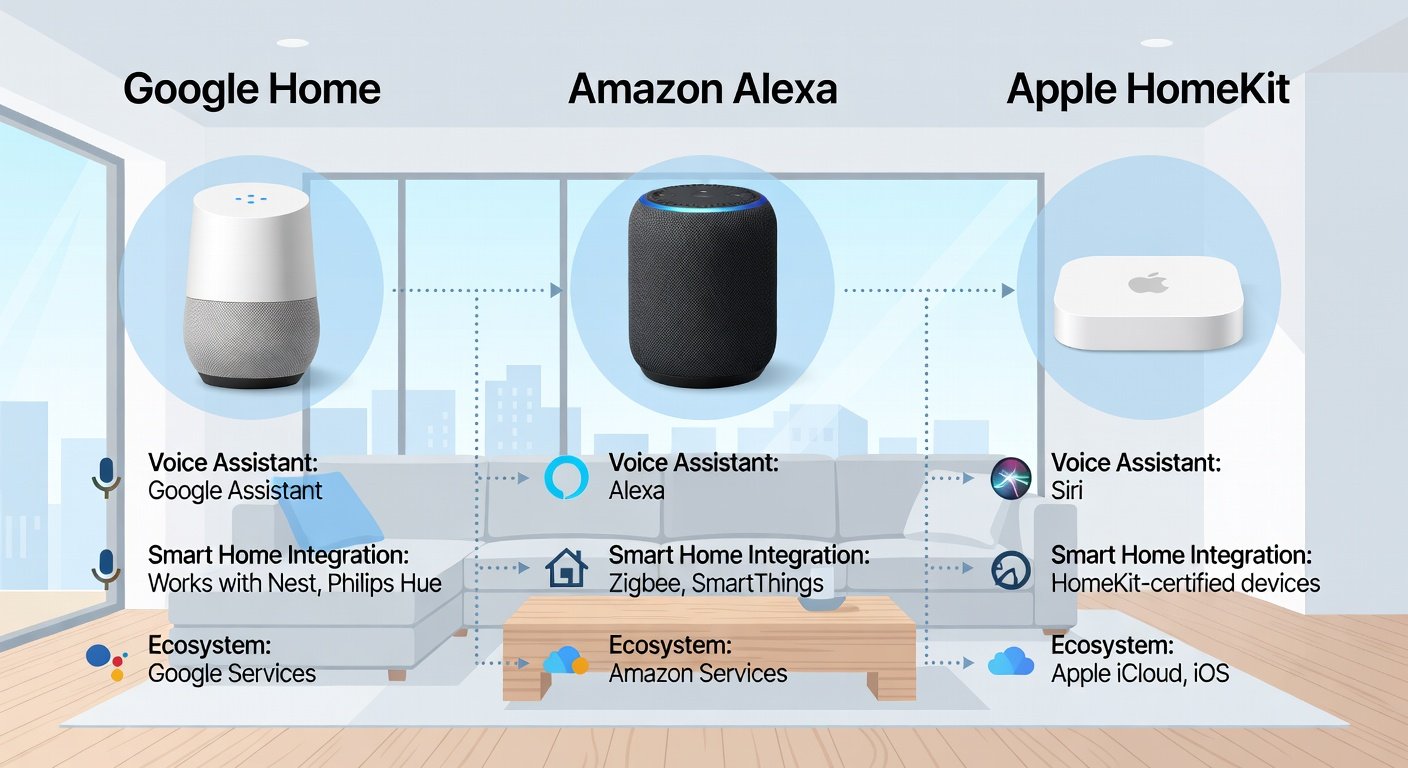
Google Home excels in integration with Android devices and Google services such as Calendar, Maps, and YouTube. It supports a wide range of third-party hardware through the Works with Google Home program and offers strong voice recognition through Google Assistant. Pros include natural language processing that handles complex commands, multi-room audio capabilities, and seamless casting to displays. Cons involve occasional privacy concerns with data collection practices and a slightly less polished automation builder compared to competitors. In practice, Google Home shines when users already rely on Google accounts for productivity and media consumption.
Amazon Alexa
Amazon Alexa boasts the largest selection of compatible skills and devices, with support for thousands of third-party products ranging from lights to kitchen appliances. It integrates well with e-commerce features and smart speakers like the Echo line. Pros include extensive customization through routines and skills, affordability for entry-level setups, and strong performance in multi-user households. Cons center on fragmented user experiences across different brands and heavier reliance on cloud processing. Alexa often appeals to homeowners who want maximum device variety and shopping integrations during a remodel.
Apple HomeKit
Apple HomeKit prioritizes security and privacy, with end-to-end encryption and on-device processing where possible. It works best within the Apple ecosystem but has expanded via the Matter protocol for broader compatibility. Pros feature robust automation scenes, aesthetic app design, and reliable performance with HomePod speakers. Cons include higher device costs and initially limited third-party options, though this gap has narrowed. HomeKit suits households invested in Apple products who value data protection above all.
Practical examples demonstrate these differences clearly. Google Home can automate living room lights based on occupancy sensors tied to Google Calendar events, while Alexa manages kitchen routines such as starting coffee makers via voice or app, and HomeKit secures bedroom environments with precise schedules that integrate with Apple Watch sleep tracking.
Compatibility with Modern Home Design Elements
Successful smart home integration respects the visual and structural aspects of a renovation. All three platforms support hidden installations such as in-wall dimmers, recessed lighting controllers, and motorized shades that blend with contemporary interiors. Google Home works particularly well with minimalist designs through its simple speaker aesthetics, while Alexa offers more color and style options in its Echo devices to match decor themes. HomeKit excels when paired with premium finishes because many compatible devices feature clean, Apple-approved industrial design.
During a remodel, consider how devices interact with materials like concrete, wood, or glass. Wireless protocols such as Thread and Zigbee help reduce visible wiring, and all major platforms now support these standards. This compatibility allows designers to maintain clean lines without sacrificing functionality.
Voice Control and Automation Examples Across Living Spaces
Effective automation transforms daily routines into effortless experiences. In living rooms, all platforms support scene activation for movie nights that dim lights, close curtains, and adjust temperature simultaneously. Kitchens benefit from Alexa’s recipe integration and voice-controlled timers, while bedrooms leverage HomeKit’s night modes for gradual lighting adjustments that support circadian rhythms. Bathrooms can incorporate humidity-sensing fans and heated floors triggered by motion or schedules.
Expanded examples include a Google Home setup that plays personalized news briefings upon waking and adjusts window shades based on sunlight sensors. An Alexa-powered kitchen might announce when groceries are low by connecting to smart refrigerators, and a HomeKit bedroom could automatically lock doors and arm security when the last person leaves. These automations require careful planning during the renovation phase to ensure sensors and controllers are placed optimally.
Real-home case examples further illustrate success. One family retrofitted their open-plan space with Google Home for unified control across zones, resulting in improved energy efficiency and convenience during evening gatherings. Another household chose Alexa to manage multiple children’s schedules through custom routines that announce homework time or bedtime. A third project used HomeKit throughout a luxury renovation to create secure, private spaces that integrated with existing Apple devices without additional hubs.
Steps for Retrofitting During a Remodel
Retrofitting smart technology during a renovation demands careful sequencing to avoid rework. Follow these expanded practical steps for optimal results.
- Assess existing wiring, network infrastructure, and device compatibility before any demolition begins. Hire an electrician familiar with low-voltage smart systems to evaluate panel capacity and run new wiring where needed.
- Choose a primary ecosystem early and verify Matter support for future flexibility. Test a few core devices in one room to confirm performance before committing to the full home.
- Install hubs, bridges, or Thread border routers in central locations during electrical and drywall phases. This placement ensures reliable coverage without visible equipment.
- Test voice commands, automations, and app controls in each room sequentially after rough-in but before final finishes. Address any dead zones or latency issues immediately.
- Integrate design elements such as hidden sensors in cabinetry, walls, or ceilings. Coordinate with interior designers to align device colors and placements with overall aesthetics.
- Document all device locations, network credentials, and automation logic for future maintenance or resale value.
These steps minimize disruption and ensure professional-grade results that feel built-in rather than added on.
Future-Proofing Tips for 2026 Tech Standards
Prioritize platforms supporting the Matter standard for maximum interoperability across future devices. Monitor firmware updates from manufacturers and consider modular devices that allow ecosystem migration if needs change. Avoid over-committing to proprietary hubs that limit options later. Invest in robust Wi-Fi 6 or 7 infrastructure and consider backup power for critical hubs. Review emerging standards from organizations focused on home automation to stay ahead of compatibility shifts.
Learn more from authoritative sources such as Apple, Amazon, and Google for the latest protocol developments and device certifications.
Privacy, Security, and Ecosystem Lock-in Considerations
Privacy remains a top concern for many homeowners. Apple HomeKit offers the strongest on-device processing and minimal data sharing by default. Google and Amazon provide user controls but generally transmit more information to the cloud. All platforms allow granular permission settings, yet understanding data flows before installation prevents surprises. Ecosystem lock-in has decreased thanks to Matter, but switching still involves reconfiguring scenes and potentially replacing some controllers.
Common Mistakes to Avoid
- Ignoring long-term subscription costs for advanced features such as advanced analytics or premium automations.
- Overlooking Wi-Fi infrastructure upgrades needed for reliable performance across larger homes.
- Selecting devices without checking cross-platform support or firmware update policies.
- Failing to plan for guest access or multi-user scenarios during the initial setup.
- Neglecting backup plans for internet outages that could disable cloud-dependent features.
Conclusion
Selecting the right smart ecosystem requires balancing immediate renovation needs with future flexibility. Whether you prioritize Google’s integration, Alexa’s versatility, or HomeKit’s privacy focus, thorough planning ensures a home that adapts gracefully to 2026 standards and beyond.
FAQ
How do these ecosystems handle privacy?
Apple HomeKit leads with on-device processing and strong encryption, while Google and Amazon offer configurable settings but rely more on cloud services for full functionality.
Can I switch ecosystems later?
Matter compatibility reduces lock-in significantly, but full migration may require replacing some hubs and reconfiguring automations across rooms.
What installation complexities exist?
Professional electricians are recommended for hardwired devices, though many starter kits use plug-and-play options with varying setup times depending on home size.
Which platform works best for large families?
Alexa often handles multiple users and routines most flexibly, while Google excels with shared calendars and HomeKit provides the most secure multi-user controls.
Are there differences in energy management features?
All platforms support energy monitoring through compatible devices, but Google integrates most directly with utility programs and usage reports.


No comments yet. Be the first!