 Fixated on Home
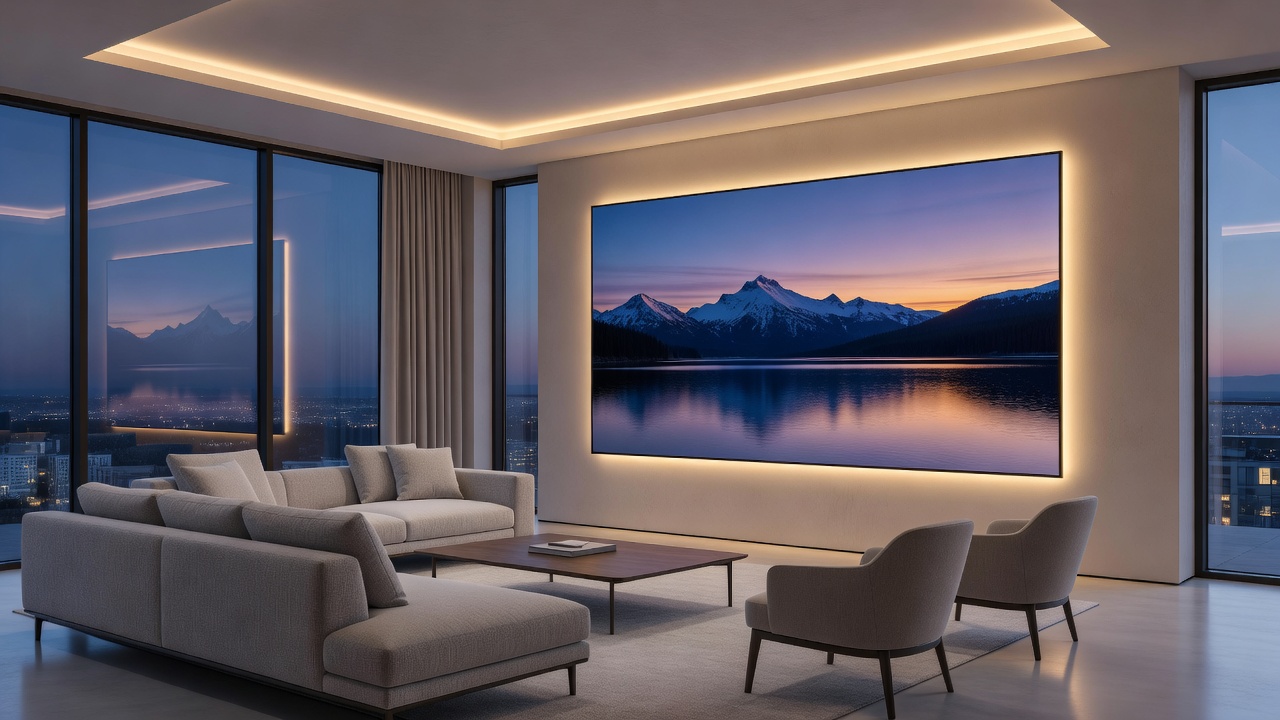
Introduction to Smart Art Displays in Modern Homes
Smart art displays represent a sophisticated evolution in home technology, blending the timeless appeal of fine art with interactive digital capabilities. In 2026, homeowners undertaking renovations increasingly seek upgrades that enhance aesthetics without overt tech disruption. These devices allow users to rotate through curated collections of artwork, photographs, or dynamic visuals while syncing with ambient lighting and home automation systems. This approach delivers subtle innovation ideal for contemporary interiors that value both form and function.
Unlike traditional framed prints or televisions, smart art displays prioritize visual elegance through matte screens and minimalist frames. They support app-based curation, enabling seamless updates to match seasonal moods or personal tastes. As part of broader smart home ecosystems, they often integrate with voice assistants and IoT devices for hands-free control. The growing popularity stems from their ability to transform static walls into living canvases that evolve with the household's lifestyle and design preferences over time.
Key Features That Define Smart Art Displays
Modern models emphasize customizable artwork libraries drawn from museums and independent artists worldwide. Ambient lighting sync adjusts screen glow to complement room illumination, creating immersive atmospheres that respond to natural light changes throughout the day. High-resolution panels ensure crisp detail whether displaying static masterpieces or animated scenes with subtle motion. App integration facilitates easy content management from smartphones, including scheduling displays by time of day or activity level.
Connectivity options range from Wi-Fi and Bluetooth to emerging standards like Matter for cross-device compatibility. Many units include built-in speakers for subtle soundscapes or integration with whole-home audio systems. Energy-efficient designs minimize consumption during idle periods, aligning with sustainable renovation goals. Additional features often include motion sensors that activate displays only when someone enters the room, UV protection layers to prevent screen degradation, and multi-user profiles that tailor content to different family members or guests.
Selecting the Right Display for Different Room Styles
Choosing a smart art display depends on room function and design language. In minimalist living rooms, opt for large-format frames with neutral bezels that mimic traditional gallery pieces and blend seamlessly with existing furniture. Bedrooms benefit from softer resolutions and sleep-mode features that dim automatically to support restful environments. Dining areas pair well with vibrant, food-inspired collections that change during meals to enhance the atmosphere.
- Living rooms: Prioritize 4K resolution and wide viewing angles for social settings where multiple people view the display simultaneously.
- Offices: Select models with productivity modes displaying motivational quotes, calendars, or inspirational imagery to boost focus during work hours.
- Hallways: Smaller, vertical orientations work best for transitional spaces where quick visual interest is desired without overwhelming narrow walls.
- Kitchens: Opt for durable, easy-to-clean frames with moisture-resistant coatings suitable for higher humidity environments.
Consider wall proportions and existing color palettes to ensure the display enhances rather than competes with decor. Measure available space carefully and account for viewing distance to select appropriate screen sizes that maintain visual impact without dominating the room.
Installation Steps for Various Wall Types
Proper installation ensures longevity and optimal performance. Begin by assessing wall material—drywall, plaster, or concrete each requires specific hardware and techniques to avoid damage. Gather essential tools including a stud finder, level, drill, and cable management kits before starting.
For drywall: Locate studs using a detector, then secure the mounting bracket with appropriate anchors rated for the display weight. Route power cables through wall channels if possible to maintain clean lines and hide wiring. Always double-check alignment with a laser level for professional results. 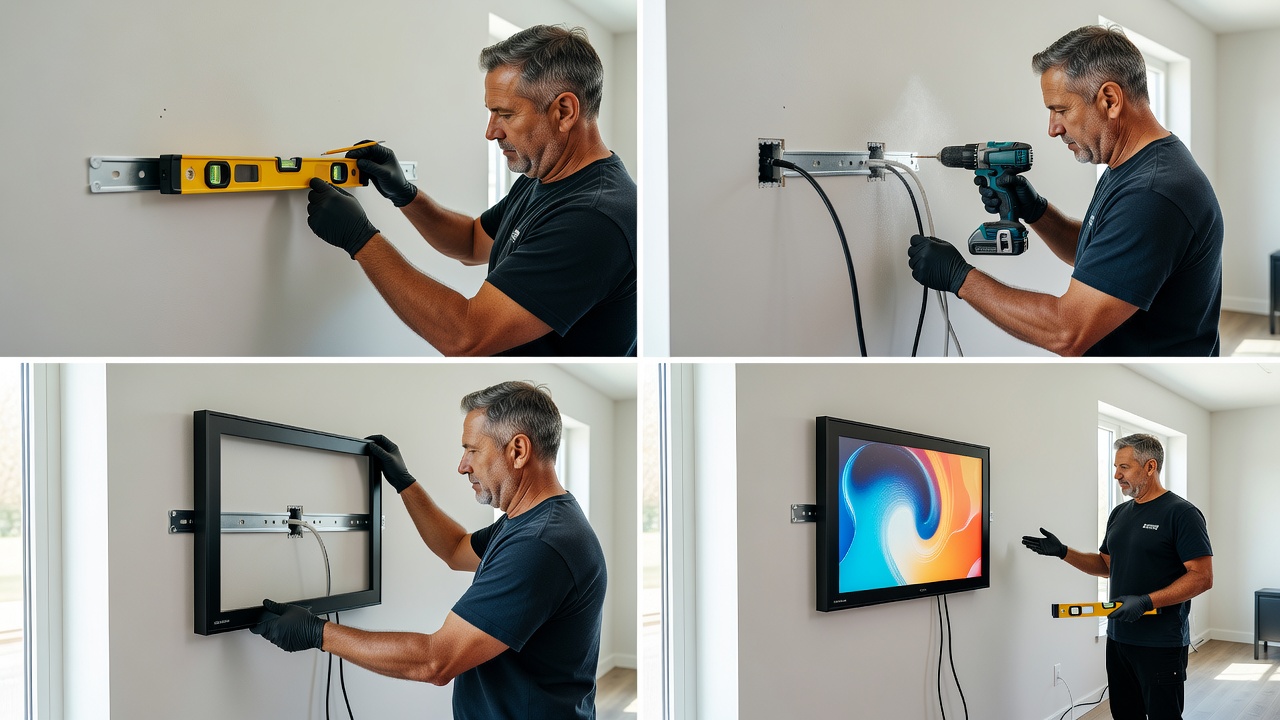
Plaster walls demand careful drilling to avoid cracking; use expansion bolts for stability and consider reinforcing with plywood backing if the display is large. Concrete surfaces benefit from masonry bits and heavy-duty anchors designed for load-bearing capacity. Always verify electrical outlet proximity and consider professional electrician consultation for hardwired options that eliminate visible cords. Test connectivity and power on the unit post-installation before finalizing placement and applying any finishing touches like trim or paint touch-ups.
Model Comparisons: Resolution, Connectivity, and Performance
Leading 2026 options vary significantly across key specifications. Higher-end units feature 4K Ultra HD panels with anti-glare coatings for bright rooms, delivering exceptional clarity for detailed artworks. Mid-range models deliver solid 1080p clarity suitable for most residential lighting conditions while offering reliable performance at lower costs. Connectivity differs: premium displays support multiple protocols including Zigbee, Thread, and Matter, whereas budget alternatives rely primarily on standard Wi-Fi networks.
Compare refresh rates for smooth animations and storage capacity for offline art libraries that function during internet outages. User reviews highlight differences in app intuitiveness, frame material quality, and customer support responsiveness. Metal frames offer premium durability and a more luxurious feel over plastic alternatives. Consider factors such as bezel thickness, available frame color options, and included remote controls or voice integration depth when making final selections for your specific renovation project.
Real-Home Examples from 2026 Renovations
Recent projects demonstrate successful integration across diverse property types. A Brooklyn loft renovation incorporated a 55-inch display above the fireplace, syncing with Philips Hue lights to shift artwork tones throughout the evening and creating dynamic focal points during gatherings. In a suburban Seattle kitchen remodel, a compact unit mounted on a feature wall displayed rotating botanical prints that complemented the minimalist cabinetry and added organic warmth to the space.
Another example comes from a historic Chicago brownstone where discreet installation preserved original plaster details while introducing modern interactivity in the study. These cases show how smart art displays elevate spaces when thoughtfully positioned and curated to reflect homeowner personality and architectural style. Homeowners report increased satisfaction with daily living environments after adding these elements to their upgrades.
Budgeting Tips and Ecosystem Compatibility Checks
Plan expenditures by prioritizing core features over extras such as advanced animation packs or premium content subscriptions. Verify compatibility with existing systems such as Alexa, Google Home, or Apple HomeKit before purchase to prevent integration issues later. Check firmware update policies and manufacturer support timelines to ensure long-term viability of the investment.
Conduct a full inventory of current smart devices to avoid integration conflicts and map out potential future expansions. Explore financing options through renovation loans if scaling the project across multiple rooms. Review warranty terms carefully and consider extended protection plans for high-traffic areas. These steps help maximize value while maintaining aesthetic and functional goals throughout the renovation process.
Mistakes to Avoid During Selection and Setup
Common pitfalls include ignoring room lighting conditions when choosing resolution or finish, leading to washed-out images in bright spaces. Overlooking cable management results in unsightly wires that undermine the clean aesthetic. Failing to test app compatibility with household smartphones can cause frustration after installation. Always measure twice and consult professional installers for complex wall types to prevent costly repairs.
Conclusion
Integrating smart art displays offers a refined pathway to modernizing homes in 2026. By focusing on selection, installation, compatibility, and avoiding common errors, homeowners achieve elegant tech infusion that enhances daily living. Thoughtful implementation transforms ordinary walls into dynamic focal points that grow with the home over years of use.
FAQ
How much power do smart art displays typically consume?
Most models use energy-efficient LED backlighting, drawing minimal wattage during active use and even less in standby. Consult manufacturer specifications and reference energy efficiency guidelines for detailed comparisons across brands.
Where can I source high-quality digital artwork?
Built-in apps often partner with galleries and platforms. Explore public domain collections or subscription services for fresh rotations that keep displays feeling new and personalized.
Are these displays compatible with older smart home hubs?
Many support backward compatibility through standard protocols, but confirm specific support lists. Standards bodies like NIST provide resources on interoperability best practices for seamless integration.
What maintenance is required?
Regular dusting of the screen and frame, plus periodic software updates, keeps units performing optimally. Avoid harsh cleaners to preserve matte finishes and extend product lifespan.
How do I handle content updates when traveling?
Most apps allow remote scheduling and updates via cloud connectivity, ensuring displays continue refreshing even during extended absences without manual intervention.
No comments yet. Be the first!